
Mistral's CLI Agent. Swap Models, Add Tools, Keep Control
Mistral's Take on an Extensible CLI Agent

Mistral just released Vibe alongside their new Devstral coding model. Another CLI coding agent enters the arena.
At roughly 12,000 lines of Python, I reviewed the entire codebase in an afternoon. With an LLM’s help, I understood
exactly how it works. Curious about something? Trace through the code. Want to extend it? You understand what you’re extending.
Compare that to Claude Code’s closed source or Gemini CLI’s 100,000 lines. This matters. It’s the difference between using a tool and understanding one.
This transparency comes from Vibe’s core philosophy: everything relevant to the CLI’s operation should be easily configurable and extendable. Want to use Claude instead of Devstral? Change a config file. Want to add a custom tool? Drop a Python file in a folder. Want to replace the entire system prompt? Point to a different markdown file. When you understand the whole system, extending it becomes natural.
In this article, I’ll walk through Vibe’s architecture, show you how to extend it in three key ways (prompts, providers, and tools), and share practical insights I discovered while exploring the codebase.
Two Practical Advantages
Beyond the manageable codebase:
It’s truly model-agnostic. Vibe defaults to Devstral, but the provider system supports any OpenAI-compatible API. Add OpenRouter and you have access to 100+ models. Run a local model with Ollama or vLLM. Switch between them with a command-line flag.
Apache 2.0 License. Fork it, modify it, ship it in your product. The license puts no restrictions on commercial use. This matters if you’re building internal tooling or integrating AI agents into your workflow.
Architecture at a Glance
Vibe follows a clean layered architecture. Here’s the high-level view:
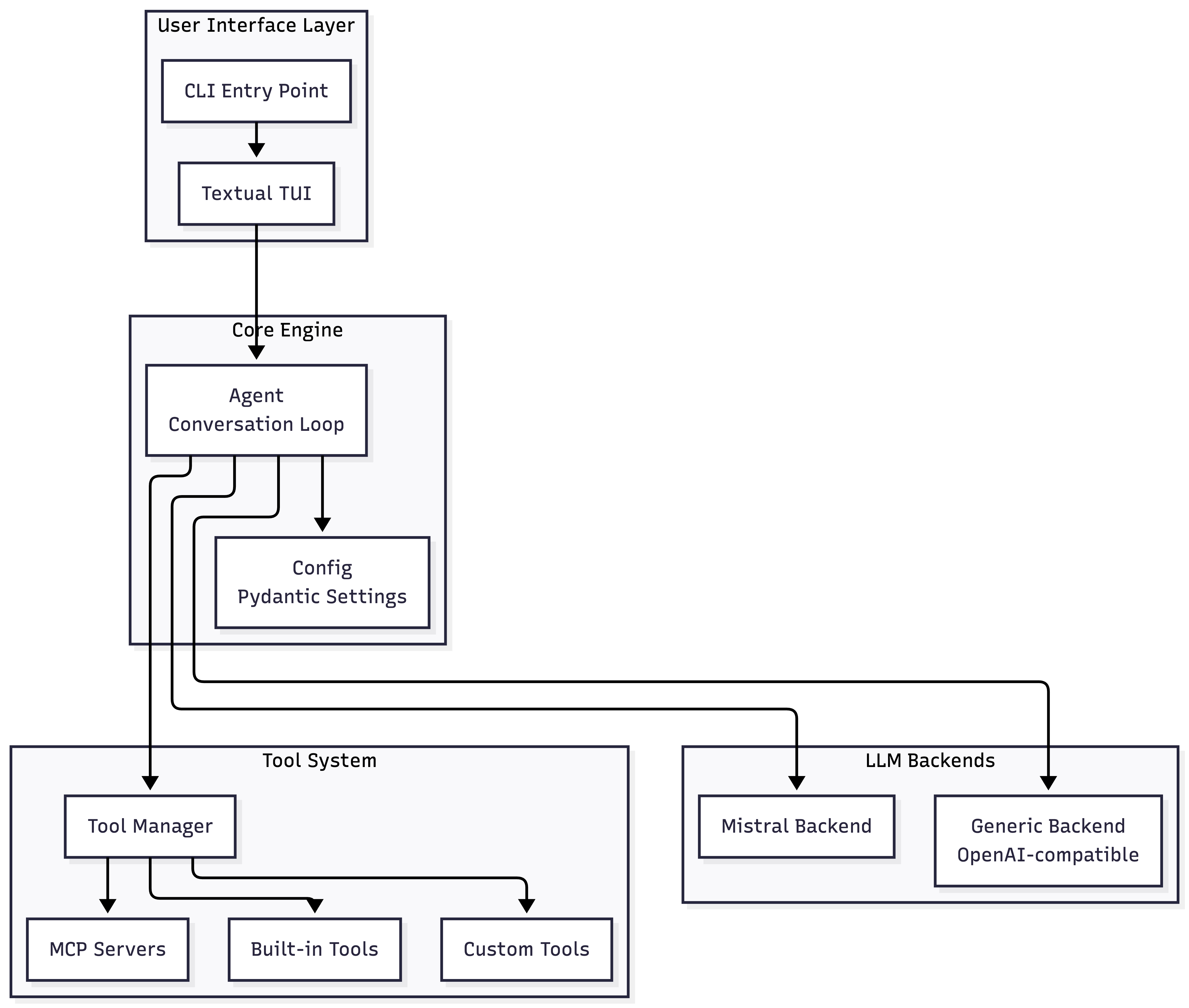
The key components live in predictable locations:
ComponentLocationLinesPurposeAgent Corecore/agent.py~800Conversation loop, tool executionConfigurationcore/config.py~475Pydantic-based settingsTool Systemcore/tools/~400Tool discovery and invocationLLM Backendscore/llm/backend/~660Provider abstractionBuilt-in Toolscore/tools/builtins/~1,275bash, grep, read, write, etc.
The conversation loop in agent.py is straightforward: receive user input, build the message history, call the LLM, execute any tool calls, repeat until the LLM responds without tool calls. Middleware hooks manage turn limits and context compaction.
The vibe user directory
The ~/.vibe/ directory deserves special mention. The Vibe team did an excellent job extracting configuration from the codebase into this single location. Most changes or extensions you might want to undertake can be accomplished in this directory.
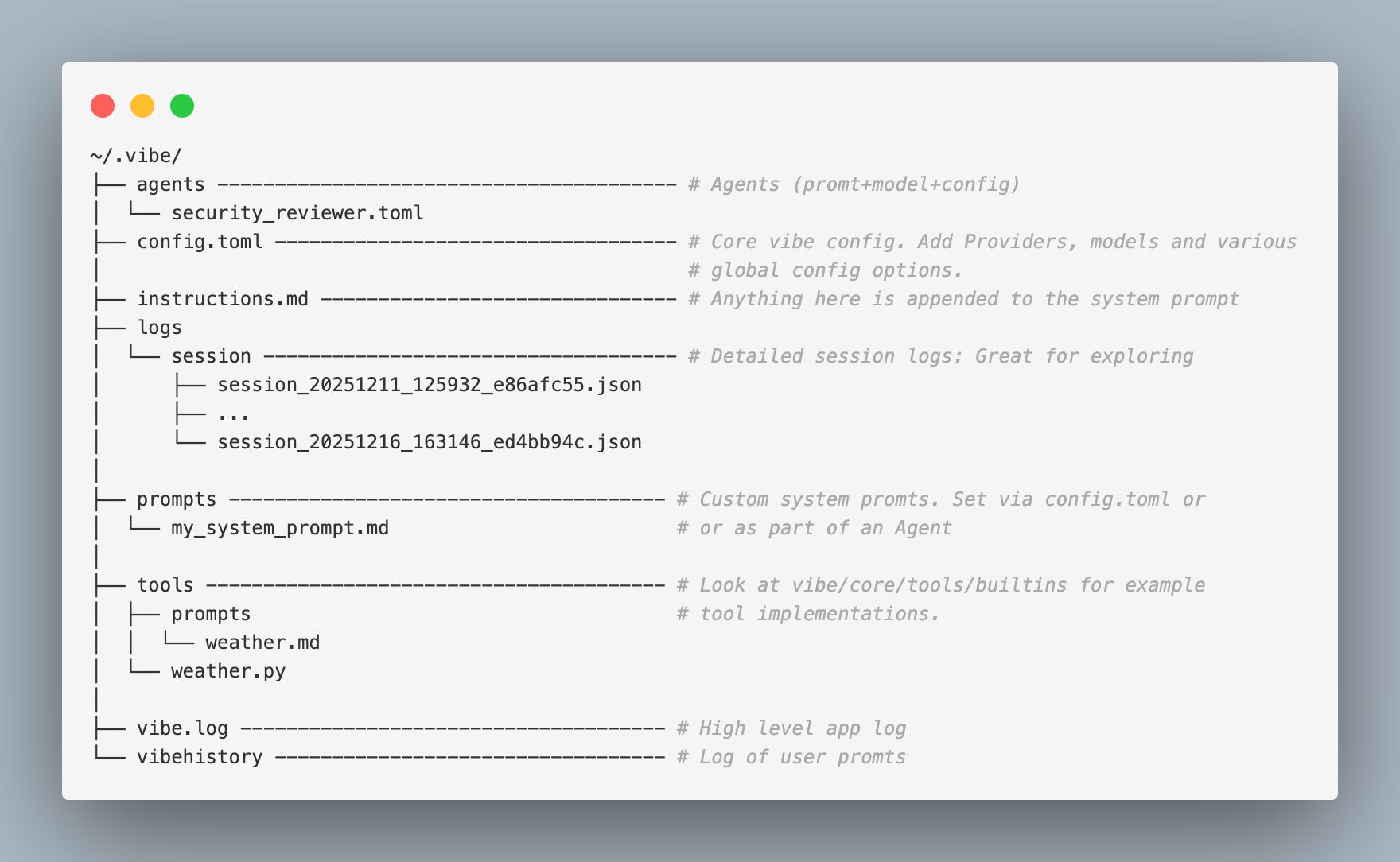
Documentation is sparse, but the code is organized well enough that searching for a config.toml key usually reveals its purpose from context.
With the architecture covered, let’s walk through three extension points that demonstrate Vibe’s configurability in practice. We’ll start with the system prompt, then move to model providers, and finally custom tools.
Extension Point: Prompt Customization
The system prompt is where Vibe’s behavior is defined. Understanding how it’s assembled helps you customize effectively and manage token costs.
How the System Prompt is Built
The assembly happens in core/system_prompt.py. Each section is conditionally included based on config flags:
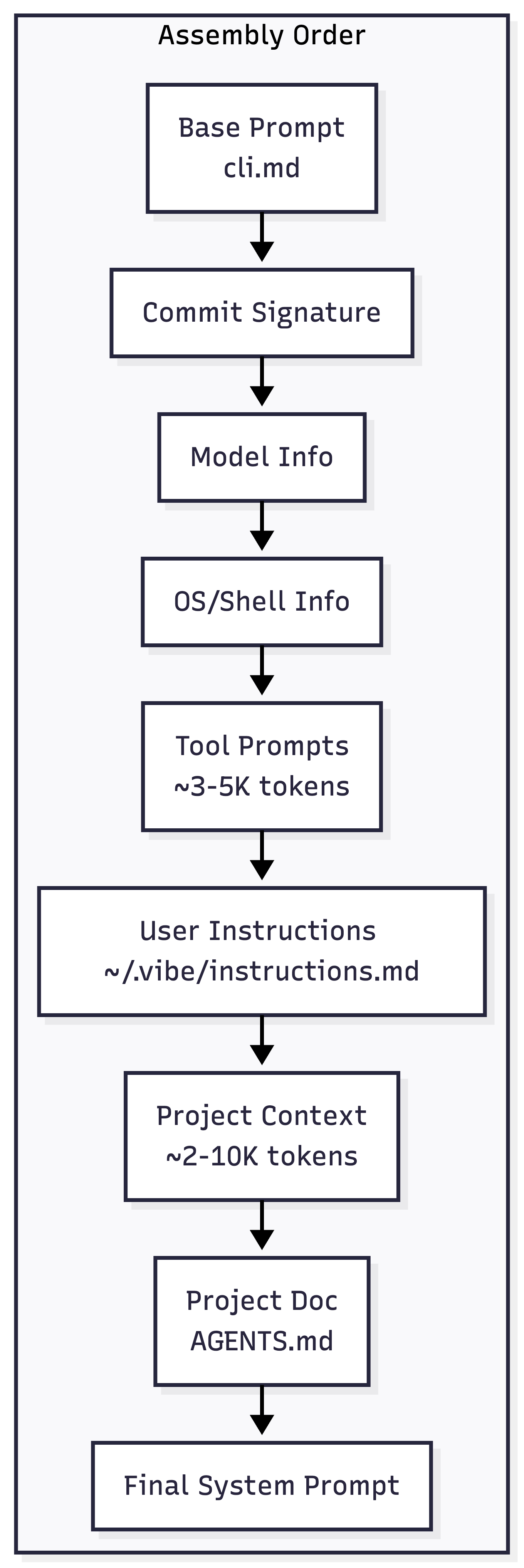
For a stock install the final prompt can easily reach 15-20K tokens for a typical project with all options enabled so consider tuning those flags on config.toml as needed (look in core/system_prompt.py to see the particular effect for each config flag). You can see the constructed final prompt for a given session in logs at ~/.vibe/logs/session/**.
Prompt Customization Points
Replace the base prompt entirely:
First create ~/.vibe/prompts/my_custom_prompt.md with the contents of your prompt. Then set system_prompt_id in config.toml:
# ~/.vibe/config.toml

system_prompt_id = "my_custom_prompt"
Now your prompt will be used vs the built-in prompt. See the default prompt at vibe/core/prompts/cli.md to get a feel for the purpose of this prompt.
Append to prompt:
If you’d just like to append additional instructions to the existing base prompt, create ~/.vibe/instructions.md. The content of that file is automatically appended after the base prompt.
Add project-specific context:
Create AGENTS.md, VIBE.md, or .vibe.md in your project root. Vibe reads this and includes it in the system prompt. Use it for project-specific conventions and architecture notes.
Extension Point: Model Freedom
The provider system is where Vibe’s flexibility shines. All configuration lives in ~/.vibe/config.toml. There is some documentation online, but we expand on that here.
The backend abstraction is simple: Mistral’s SDK for native Mistral models, a generic OpenAI-compatible client for everything else. This means any service that speaks the OpenAI protocol works out of the box.
Adding OpenRouter as a model provider
OpenRouter gives you access to Claude, GPT-4, Llama, Gemini, and dozens of other models through a single API. OpenRouter provides an OpenAI compatible API for all models thus making them natively compatible with Vibe.
Here we add 2 models from the OpenRouter provider:
# ~/.vibe/config.toml

[[providers]]
name = "openrouter"
api_base = "https://openrouter.ai/api/v1"
api_key_env_var = "OPENROUTER_API_KEY" # located in ~/.vibe/.env
backend = "generic"

[[models]]
name = "anthropic/claude-sonnet-4"
provider = "openrouter"
alias = "claude"

[[models]]
name = "google/gemini-2.0-flash-001"
provider = "openrouter"
alias = "gemini"
I found I could also utilize my OpenCode Zen models (it is OpenAI compatible)
[[providers]]
name = "opencode"
api_base = "https://opencode.ai/zen/v1"
api_key_env_var = "OPEN_CODE_API_KEY" # located in ~/.vibe/.env
api_style = "openai"
backend = "generic"

[[models]]
name = "gemini-3-flash"
provider = "opencode"
alias = "zen:gemini-3-flash"
If you have the hardware, you can also run Vibe against local models using Ollama, vLLM, or any OpenAI-compatible local server.
Once configured, switch models as you start Vibe:
vibe --model claude    # Use Claude via OpenRouter
vibe --model gemini    # Use Gemini via OpenRouter
vibe --model qwen      # Use local Qwen
Or use the /config slash command within a session to change models without restarting.
Defining Custom Agents
Vibe also supports an agents concept, which bundle a model, system prompt, configuration such as tool permissions into a reusable persona. Create a TOML file in ~/.vibe/agents/ and invoke it with:
vibe --agent security_review_assistant
Useful for creating specialized personas: a security reviewer with restricted tools and a focused prompt, a documentation writer with a different model and writing-focused instructions. See the configuration docs for examples.
Extension Point: Custom Tools
With Vibe, Tools are how the LLM interacts with the outside world. If you’re familiar with Claude Code’s Skills, Vibe’s tools serve a similar purpose: they give the agent new capabilities. The difference is that Vibe tools require implementing a Python BaseTool class and an optional prompt rather than just providing a prompt file.
~/.vibe/
├── ...
│
├── tools
│  ├── prompts
│  │  └── weather.md ------ # Optional detailed explanation of the tool (appended to system prompt)
│  └── weather.py --------- # Implementation of the tool. (Can think of it as a local MCP "tool")
├── ...
You can think of Vibe tools as a cross between a local MCP server and a Claude Code Skill. Like MCP, they’re code-based and can do anything Python can do. Like Skills, they’re discoverable and integrate seamlessly with the agent.
The elegant part: because tools are implemented as BaseTool subclasses, Vibe can represent MCP servers the same way internally. When you configure an MCP server, Vibe creates proxy classes at runtime that wrap each MCP tool as a BaseTool. The agent doesn’t distinguish between local and remote. This keeps the core codebase simple while supporting both extension patterns.
How Tools Work
When Vibe starts, the Tool Manager scans a hierarchy of directories for Python files containing BaseTool subclasses:
vibe/core/tools/builtins/- Built-in tools (bash, grep, read_file, etc.).vibe/tools/- Project-local tools~/.vibe/tools/- Global user tools
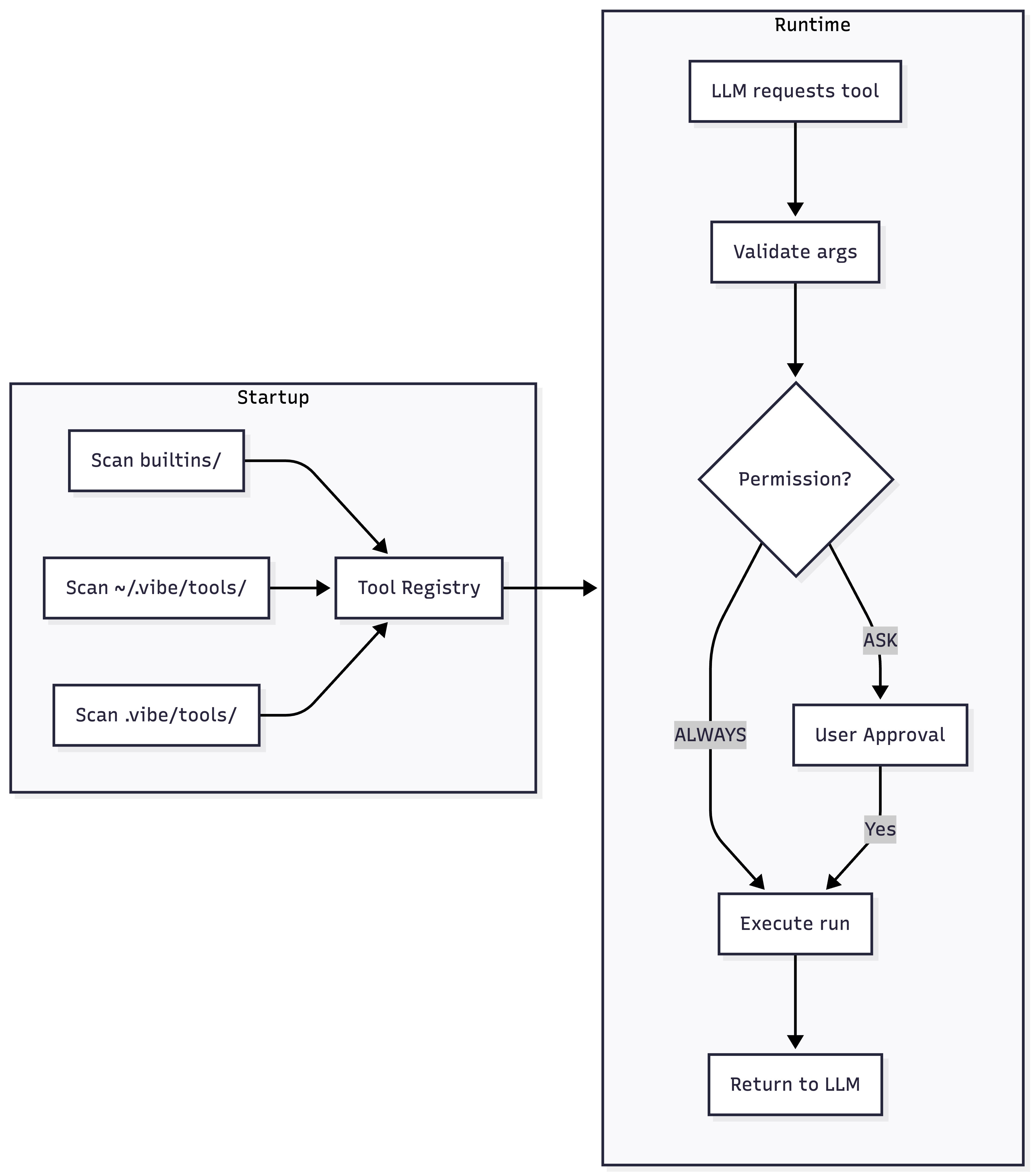
Each tool exposes its name, description, and parameter schema. This is what is shared with the LLM. When the LLM decides to use a tool, Vibe validates the arguments and calls the tool’s run() method.
Anatomy of a Tool
Every tool consists of four Pydantic models plus the tool class. Here’s a minimal weather tool to illustrate the pattern:
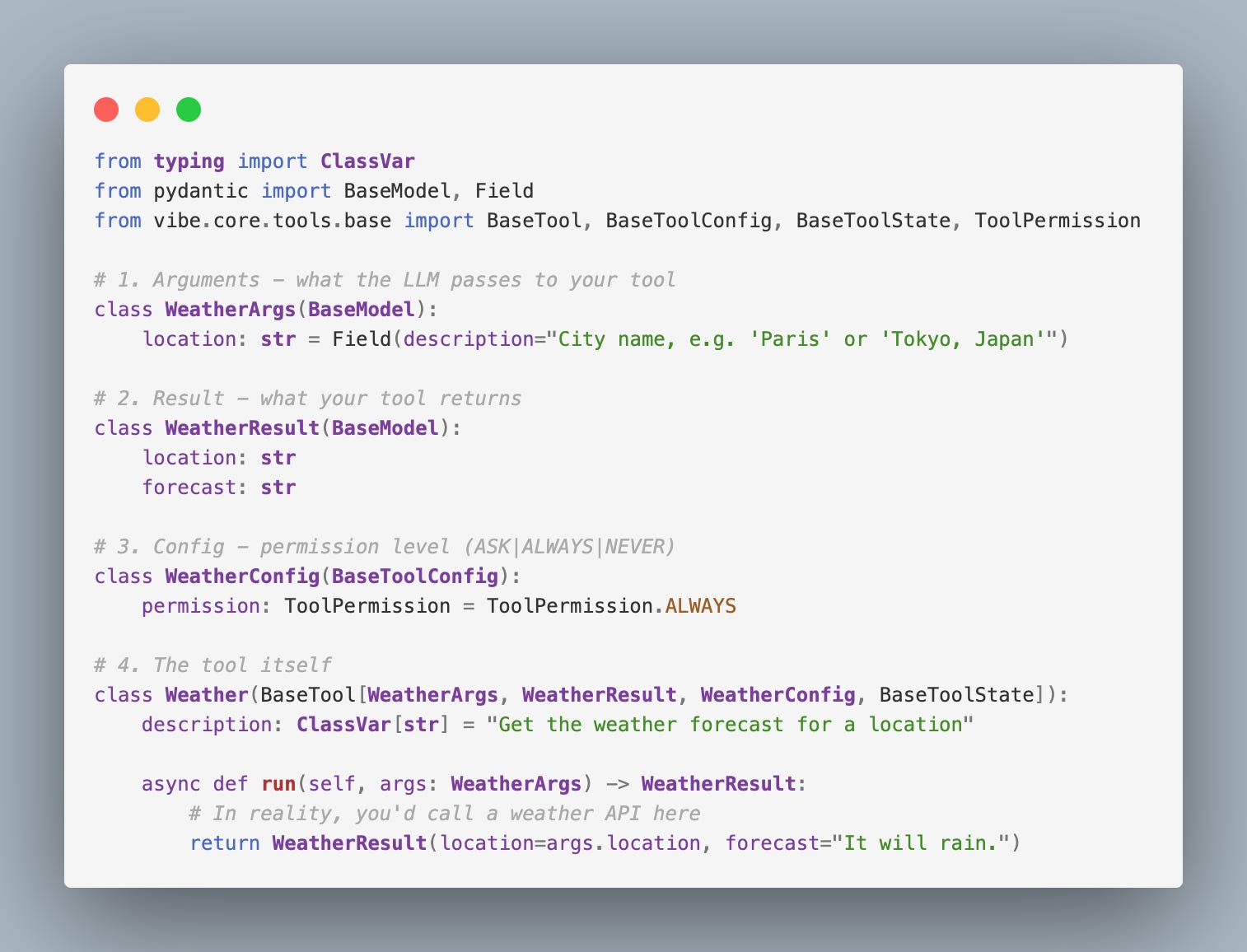
Save this as ~/.vibe/tools/weather.py and it’s immediately available. If you wanted to present an extended description of the use of this tool, just add ~/.vibe/tools/prompts/weather.md. Note the content of a tool’s prompt file is appended to the system prompt.
The Field(description=...) text is sent to the LLM API as part of a list of available tool. Be specific about expected formats and provide examples where helpful. Take the same approach as you would for describing MCP tools.
MCP Configuration
In Vibe MCP configuration is similar to what you see in other tools, the TOML format being really the only difference:
[[mcp_servers]]
name = "context7"
transport = "streamable-http"
url = "https://mcp.context7.com/mcp"
headers = { "Authorization" = "Bearer YOUR-API-KEY" }
Here we’ve added the ever-popular Context7 server. Vibe has further MCP configuration documentation online.
Getting Started
Vibe gets you running in seconds with sensible defaults. Start there, then customize as you discover what you need.
Installation
The quickest path:
curl -LsSf https://mistral.ai/vibe/install.sh | bash
If you want to develop on Vibe itself, clone the repo and run it from there:
git clone https://github.com/mistralai/mistral-vibe.git
cd mistral-vibe
uv run vibe
This way, you can experiment with altering the code base, and changes are reflected immediately when you next uv run vibe. See the install docs for additional options.
The first run triggers an onboarding wizard that creates ~/.vibe/config.toml with sensible defaults.
Closing Thoughts
The CLI agent space is moving fast. New models appear weekly. Providers rise and fall. The tool you commit to today might not be the right choice in six months.
For me, Claude Code remains my daily driver. But Vibe has earned a permanent spot in my toolkit. It’s where I go to experiment with other models in a CLI context and to understand how these agents actually work under the hood.
By treating the model as a swappable component and making extension the default path, your custom tools, prompt customizations, and workflow integrations survive model changes. That transparency builds intuition for what these agents are actually doing.
Pick one thing to try:
Swap in a different model. Add the OpenRouter config and run
vibe --model claude. Feel what it’s like to not be locked in.Build a simple tool. The weather example takes five minutes. Drop it in
~/.vibe/tools/and watch it appear.Read the conversation loop. Open
core/agent.pyand trace throughact(). It’s 800 lines that explain how every CLI agent works.
Vibe isn’t trying to be the most powerful agent. It’s trying to be the one you can understand, modify, and trust.
Resources: